
How to Avoid Sloppy Loops
TL;DR
- Agent loops don’t make code clean: deterministic tracks and hard gates do.
- My experience: 10 years in AAA games, 5 iOS apps in 2 months with agent loops.
- This post shares the setup that has worked for me.
Introduction
In AAA work, small mistakes ship at full scale. That changed how I think about agent loops.
I’m Yashas. My background: over a decade in the AAA game industry with titles like Forza, Starfield, Fallout 76, and Apex Legends, where anything shipped wrong hits millions. Now I’m an Xbox Cloud engineer and also build iOS apps for individuals and small businesses.
I’ve been building those apps with a squad loop (an autonomous-agent team workflow cycling through development steps without human intervention) over the past two months, and here’s what has held up. People assume the trick is a smarter model. It isn’t.

View on GitHub
Quality has to be structural
An agent loop multiplies output, and output without standards is slop: plausible code that’s subtly wrong, dead abstractions, and ignored instructions. A loop that runs while you sleep is trustworthy only if quality is built into the track, not left to the model’s good intentions.
I assume any rule I can’t enforce with a tool will eventually slip, so I don’t ask the agent to be careful; I make the standard mechanical.
Lay the track before the train moves
I treat the loop as a train that moves fast without improvising its route, so I lay the track before it moves.
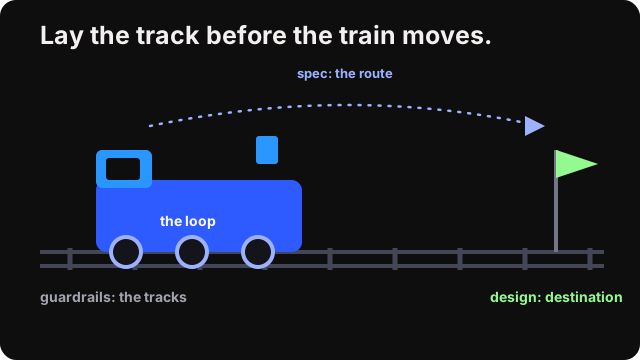
Spec is the route. Design is the destination. Guardrails are the tracks.
The load-bearing principle is the outsider review. An agent grading its own work always gives itself a gold star, not due to malice, but because the context it carries blinds it to the obvious.
The actual stack
Rules first: spec-kit
Before any code, I run each feature through spec-kit, which turns spec-driven development into a chain of commands: constitution → specify → clarify → plan → tasks → analyze → implement. clarify and analyze act as quality gates, with a converge step looping back to implement until nothing’s left. The first command is the tell, constitution: you write the project’s rules before any code. A large-context model (I use Opus 4.8) runs the investigation, identifies gaps in architecture, OS, and language, and returns an interactive clarification flow. I answer the hard questions once, up front, instead of finding them in a pull request three days later.
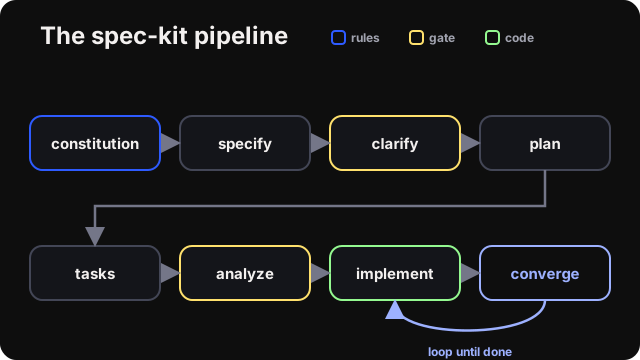
spec-kit: write the rules first, gate the rest.
The look: one design system
The plan then goes to a design tool. The prerequisite is a single design system, mine built on Apple’s Human Interface Guidelines and accessibility guidelines standards, reused across every app. I’m not a designer, so a consistent system saves me from having to re-decide the visuals on every screen. If you’re in the same boat, current AI design tools can get you close: Claude’s design tooling, Google Stitch, and similar tools will produce a usable starting system.
Gates, not vibes: four Swift tools
Regarding Swift, the tracks are SwiftLint, SwiftFormat, Periphery, and Danger. They fail the build, so the train can’t roll past them.
These automated tools catch the most common sources of “slop” before they reach production:
- Inconsistent spacing, color, type → Design-token lint rules: raw literals fail the build
- Force-unwraps, magic numbers → Safety rules as errors
- Dead code accumulating → Dead-code scan in strict mode
- A new view with no test → Changeset rule: new view requires companion test
- Agent silencing a gate → Suppression comments banned
- Agent grading its own work → Fresh zero-context review
- Old regressions creeping back → Every rule encodes the bug that created it
| Gate | Enforces | Teeth |
|---|---|---|
| SwiftLint | style, design tokens, safety | 26 custom rules; errors, not warnings |
| SwiftFormat | formatting | --lint fails on any drift |
| Periphery | dead code | --strict: any unused declaration fails |
| Danger | changeset policy | 7 rules (new view requires companion test, no suppressions) |
Almost every custom rule was born from a specific bug and cites the incident that created it, making a past slop incident permanent so the loop can’t re-trip the same wire twice.
Tests on both sides
Every task writes tests before implementation, then builds against them. Layout and behavior are verified with static rules and deterministic unit tests, not UI automation, which is slow and flaky. The standard is set before the code exists, and the code is built to meet it.
An outsider reviews: a pre-commit hook
A pre-commit hook shells out to a brand-new copilot -p "/review" session that sees only the diff and writes its findings to a file. No agent grades its own work, so this reviewer starts fresh every time.
Advise vs block
The review is advisory: it never blocks on quality findings. The loop fixes issues by priority and may skip one only with written justification I can review later. The one exception is a leaked secret, which stops the commit because committing a credential is the only place where “stop the line” is correct.
Then it ships
A pull request opens, the build and tests run, and CI going green is the merge gate, not a human. The agents squash-merge. At that point, I’m out of the loop, returning only to spec a new feature or use the app about once a week.
Why does Codex run the loop?
The loop lives in a terminal, so I run the model that wins the terminal benchmark. As of mid-2026, on Terminal-Bench 2.0, which measures real CLI agent work, GPT-5.3 Codex leads at around 77% to Opus 4.8’s ~75%, and it costs a fraction as much per token for a loop that runs all day. Codex does the building; Opus handles the spec and the up-front reasoning, where its larger context earns its keep.
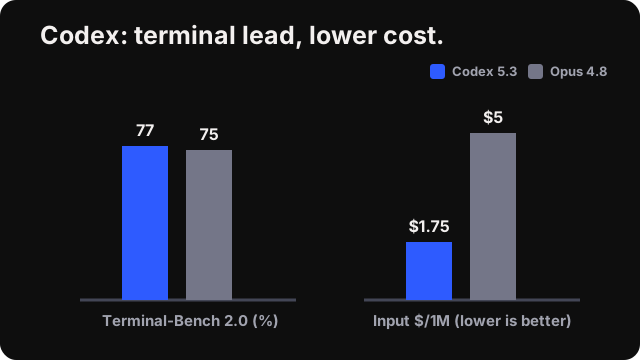
Codex leads terminal benchmarks and is significantly more cost-effective.
| Model | Terminal-Bench 2.0 | Input $/1M |
|---|---|---|
| GPT-5.3 Codex | ~77% | ~$1.75 |
| Opus 4.8 | ~75% | $5 |
Prices from vendor pages, approximate.
The point
These tools make my standards mechanical rather than making the model smarter. Distill your engineering judgment into specs, tools, and reviews once, and the loop reproduces it on every commit, whether or not you’re watching.
FAQ
Why not just use a smarter model instead of building all this tooling?
A smarter model still writes plausible code that’s subtly wrong under pressure. Output without standards is slop regardless of model quality. Quality has to be structural, built into the track with rules, gates, and outsider review, not left to any one model’s judgment or good intentions.
What is a deterministic gate?
A deterministic gate is a tool-enforced check, like SwiftLint, SwiftFormat, Periphery, or Danger, that fails the build the same way every time a rule is broken. It replaces trusting an agent to be careful with a rule a machine checks mechanically, so the standard can’t quietly slip.
Why does an outsider review matter if the agent already checks its own work?
An agent grading its own output almost always approves it: the same context that produced the code also blinds it to the code’s flaws. A fresh, context-free reviewer, like a pre-commit hook that shells out to a brand-new review session, catches what self-review consistently misses.
When does the loop actually stop instead of just flagging an issue?
Almost every finding is advisory: the loop fixes issues by priority and may skip one only with written justification for later review. The single hard stop is a leaked secret, since committing a credential is the one case where blocking the commit outright is the correct call.
Sources
- squad, GitHub, retrieved 2026-07-07
- spec-kit, GitHub, retrieved 2026-07-07
- Terminal-Bench 2.0 leaderboard, retrieved 2026-07-07
Yashas is a game streaming engineer at Xbox Cloud, ex-AAA game developer, and indie iOS builder. Find more at Puzzle Quest Games.